For Developers
This page is intended for developers who want to contribute to the development of LibrGetter, or just want to understand how it works under the hood. It contains information about the architecture of the mod, how to set up the development environment and how to contribute.
⚠️ Warning
This documentation is still work in progress. Stuff may change without notice, and some of the features may not be documented yet.
Build
You can build the project yourself.
For this just clone the repository and run ./gradlew build.
The compiled mod jar can be found under build/libs/.
Note, that you’ll need Node.js installed on your system,
to be able to run Version't.
Code Style
LibrGetter follows a code style based on the default IntelliJ code style for Java, with some adjustments
in favor of readability and personal preferences. The code style settings are included in the repository,
under the path styles/IntelliJ_IDEA.xml. You can import this file to your IDE to automatically apply
the code style settings.
If your IDE does not support IntelliJ style files, you can also auto-format the code using a headless IntelliJ installation. This section will be added in the future, but for now, you could look into how to do that by following the CI/CD action for IntelliJ formatting.
Internal Architecture
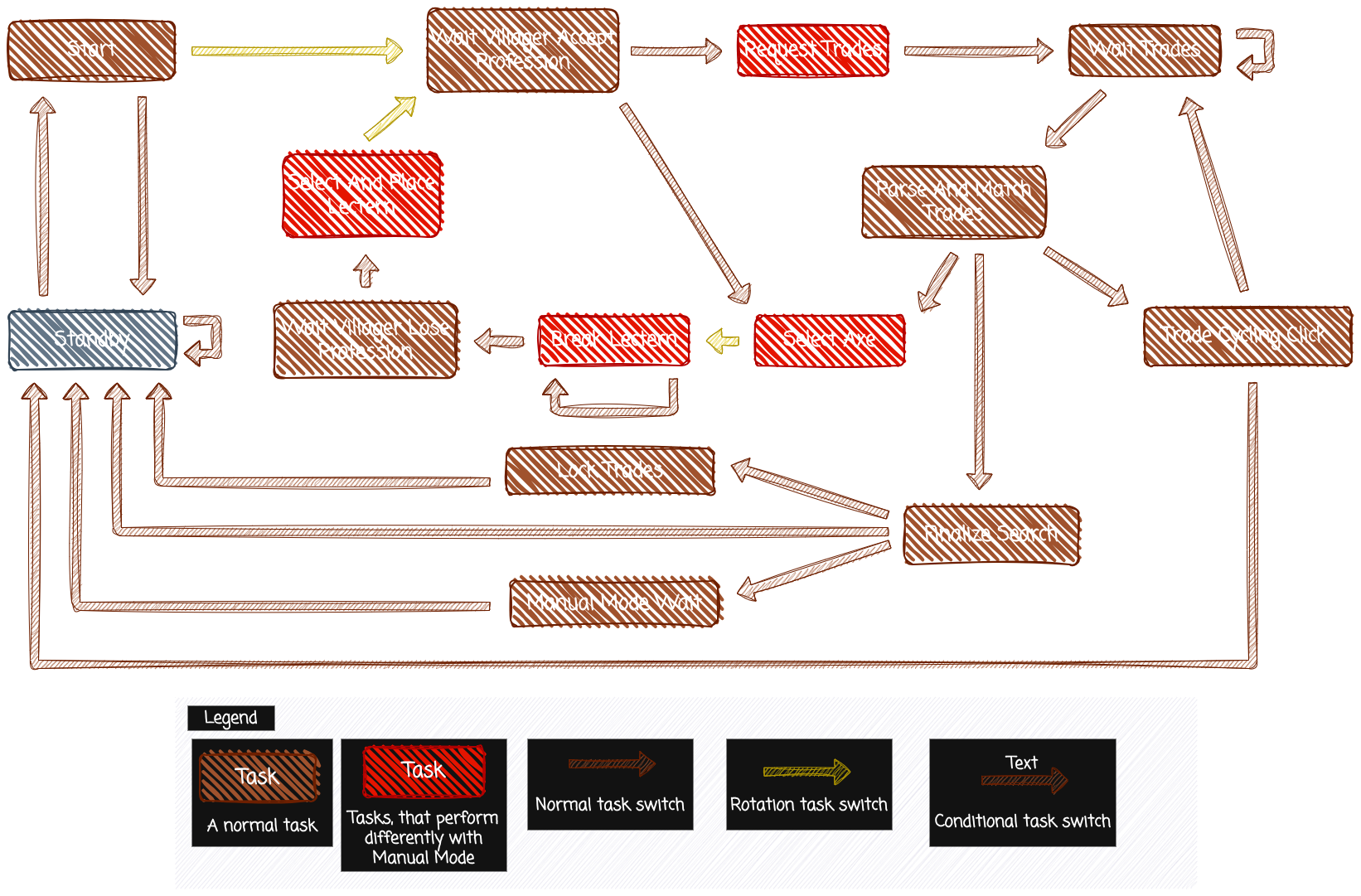
Task Flow